AirborneOps Learning Labs · AI architecture
How an LLM system turns a request into an answer
A language model is one part of an AI application. Follow a simple IT support question to see how the application, instructions, connected information, Gemini, and review fit together.
Learning outcome
After this lesson, you can describe how a request moves from a user through an app and its language model, how retrieval or a tool can add approved information, and how the app returns a checked answer.
This is a public reading lesson. It does not connect to Gemini or to any live IT system.
One request, end to end
A sample VPN support question
Fictional teaching example: the status and runbook details below are made up. They do not describe a real network, service, or operating procedure.
“Is the training VPN online? If it is, what should I check first when I cannot connect?”
For this example, imagine an approved, read-only status tool returns “online” and a search of the sample runbook finds “confirm that the approved VPN profile is selected.” The application combines those results with the question and asks Gemini to answer using only the supplied information.
Answer shown in the app
The sample status lookup reports that the training VPN is online. The sample runbook says to check that the approved VPN profile is selected.
A conceptual architecture example
See where Gemini fits
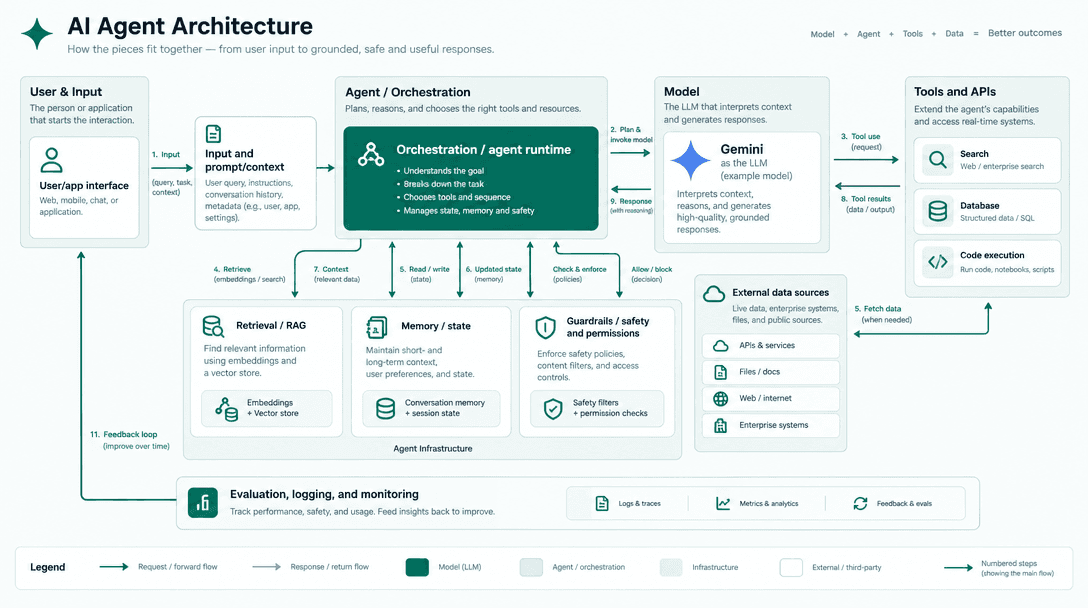
The same diagram in words
The user and application start the request
A person enters a question in an app. The app receives it and checks the person’s access before using any connected information.
Orchestration coordinates the work
The app’s coordinator decides which approved sources or tools are needed, manages the steps, and prepares what to send to Gemini. Orchestration is the name for that coordination.
Retrieval searches connected data
The app can search approved documents or other connected data and supply relevant results as context. Gemini cannot see those sources unless the application provides the results.
Prompt and context go to the model
A prompt is the instructions and question sent to the model. Context is extra information supplied with it, such as a retrieved runbook passage or relevant conversation history.
Gemini generates a candidate response
Gemini is the example large language model (LLM), software trained to recognize patterns in language and generate text. It returns text or a tool request to the application.
The app handles tool requests
If Gemini requests a tool, the application checks and executes the permitted function, then returns its result to the model. The model does not run application code itself.
Memory and safety controls support the workflow
An application may provide relevant, deliberately retained conversation state. Access checks, data limits, tool permissions, and content filters help control risk; their exact placement depends on the application.
The application returns the answer to the user
Gemini’s generated response travels back through the application. The app applies its checks, then displays the answer and useful source information in the user interface.
Evaluation feeds improvements back into the system
Teams test representative examples and review quality, safety, and usage signals. Those findings can guide changes to prompts, retrieval, tools, or review steps over time.
The supporting parts
What happens around the model?
In the sample request, the app does some work before Gemini drafts an answer and checks the result before showing it. The diagram is a guide to common choices, not a required blueprint.
01 · User and application
The user asks; the app receives
The person enters a question in a web or mobile interface. The application is the software connecting that interface to the model and any data or tools. It should check which information this person may access before retrieving it.
02 · Orchestration and prompt
The app coordinates the steps
Orchestration is the app’s coordination logic: it selects allowed sources or tools, tracks their results, and decides what to send next. The prompt contains the question plus instructions such as “use the supplied sources, and say when they do not answer the question.” In the example, the context is the sample VPN status and the matching runbook passage.
Read Google’s Gemini prompt design strategies for guidance on structuring clear model instructions.
03 · Connected data and retrieval
Retrieval finds useful source material
Connected data means information an app is allowed to read, such as a runbook or service record. Retrieval searches that information for passages related to the question and supplies selected results as context. This approach is often called retrieval-augmented generation (RAG): the app retrieves information, then the model uses it to draft a response. The model does not gain automatic access to the source.
Google’s Gemini File Search guide explains how indexed information can be retrieved and supplied to a model as context.
04 · Tools
A tool lets the app use an approved function
A tool is a function the application can run, such as a read-only status lookup. The model can ask for a tool by returning its name and inputs; the application checks permission, runs the function, and sends the result back to the model. The model proposes a call; it does not execute the app’s code by itself. In the sample, the training VPN status result is returned to the model before it writes the answer.
Google’s function calling guide documents the handoff between a model, the application, and its functions.
05 · Memory and safety controls
Keep context and permissions deliberate
Memory is information an application chooses to retain or reuse, such as recent turns in the same conversation. It is not automatic, unlimited model memory. A team should decide what is stored, who can use it, and when it expires. Safety controls can check access, limit what data and tools are available, and filter unsuitable inputs or outputs. Model safety settings are one layer; they do not replace application permissions, review, or operational safeguards.
See Google’s Gemini safety settings for model content filters and configuration.
06 · Generated response and evaluation
The app reviews a draft, then returns an answer
Gemini’s generated response is a candidate answer, not proof that its claims are true. The app can check that it follows the expected format and is supported by the supplied sources, then display it with the relevant source. Evaluation means checking representative examples against clear criteria, such as whether an answer is supported, useful, and safe. Teams use the results to improve the whole workflow; evaluation does not make any one response infallible.
Google Cloud’s generative AI evaluation overview describes one Google Cloud service for assessing generative AI models.
Learning check · 5 questions
Check your understanding
Follow the request from access checks through evaluation. Choose an answer to see how it fits the architecture.
Question 1 of 5
Continue with primary sources
Official documentation
These references explain the Gemini API concepts connected to the lesson. The architecture above remains a general teaching example, not a Google product diagram.
- Gemini API documentation
Google AI for Developers · an overview of using Gemini in applications.
- Prompt design strategies
Google AI for Developers · clear instructions and prompt structure.
- File Search
Google AI for Developers · retrieval and retrieved context for Gemini.
- Function calling with the Gemini API
Google AI for Developers · how the application executes model-requested functions.
- Safety settings
Google AI for Developers · configurable model content filters and thresholds.
- Generative AI evaluation overview
Google Cloud documentation · one service’s approach to evaluating generative AI models.